.svg?width=185&quality=80&auto=webp&format=auto&cache=true&immutable=true&cache-control=max-age%3D31536000 "Home")


.svg?width=13&quality=80&auto=webp&format=auto&cache=true&immutable=true&cache-control=max-age%3D31536000 "Top Navigation - Sign in - Icon")


In September 2025, Sophos Managed Detection and Response (MDR) teams identified a malvertising campaign distributing an infostealer dubbed TamperedChef – believed to be part of a wider campaign known as EvilAI.
Previous coverage of this campaign suggests it began on June 26, 2025, with many of the associated websites being registered or first identified on that date. The sites were promoting a trojanized PDF editing application called AppSuite PDF Editor via Google Ads. This application appeared legitimate to users, but silently deployed an infostealer upon installation, targeting Windows devices.
Through telemetry analysis and threat hunting, Sophos MDR confirmed that over 100 customer systems were affected before our detection and response efforts began.
According to Sophos telemetry, the majority of victims affected by this campaign are in Germany (~15%), the United Kingdom (~14%), and France (~9%). Although the data highlights a significant concentration in Germany and the UK, it likely reflects the campaign’s widespread global reach, rather than any deliberate targeting of specific regions; we identified 19 countries affected in total.
Victims of this campaign span a variety of industries, particularly those where operations rely heavily on specialized technical equipment – possibly because users in those industries frequently search online for product manuals, a behavior that the TamperedChef campaign exploits to distribute malicious software.
Further investigation revealed that this large, multi-layered distribution network featured multiple advanced tactics, including a delayed activation/dormancy period, decoy software, staged payload delivery, staged payload delivery, abuse of code-signing certificates, and efforts to evade endpoint protection mechanisms.
According to other researchers, the campaign appears to still be active, with new components still being uncovered and supporting infrastructure continuing to operate (although the domains we observed in our investigations now seem to be inactive).
Note: While Sophos MDR teams were investigating this threat, we became aware of additional research into TamperedChef published by TrueSec, WithSecure, G Data, and others. Our research confirms and validates some of these findings.
Timeline

The TamperedChef malvertising campaign appeared to evolve from early experimentation to widespread credential theft, before detection by defenders:
August 2024 — Early activity by the threat actors
According to Truesec, the operators behind TamperedChef first appeared using suspicious potentially unwanted applications (PUAs) such as OneStart and Epibrowser — seemingly benign ‘utility tools’ promoted through ads. These served as early tests for their delivery networks and code-signing abuse strategy.
June 26, 2025 — Campaign launch
The full TamperedChef operation began with the registration of multiple look-alike PDF utility websites. Google Ads and SEO poisoning were used to lure users into downloading the trojanized AppSuite PDF Editor installer.
June-August 2025 — Dormant deployment period
Once installed, the malware remained inactive for ~56 days. This strategic delay aligned with the typical duration of paid advertising campaigns, maximizing the number of infected systems before malicious behaviors were triggered.
August 21, 2025 — Remote activation of the payload
Attackers issued commands to the installed software, activating hidden infostealer capabilities. The malware collected browser credentials, cookies, and sensitive data — while establishing persistence through scheduled tasks and registry changes.
September 3, 2025 — Sophos MDR detection and response
Sophos investigators discovered more than 300 impacted hosts across over 100 customer environments, prompting an active threat hunt and coordinated takedown action against malicious domains and infrastructure.
September 11–16, 2025 — Completion of hunt operations
A multi-day remediation effort successfully removed the threat from monitored systems. However, ongoing discovery of related domains and new certificates indicates that the adversaries behind TamperedChef continue to evolve and remain active in the ecosystem.
Attack chain
As with many malvertising campaigns, the attack chain typically begins with a victim typing a query into a search engine – in this case, a query relating to appliance manuals or PDF editing software. Alternative vectors include malicious links on deceptive forums (or deceptive threads in legitimate forums), or in phishing emails.
Malicious adverts, created by the threat actor, are subsequently shown to the victim, either through search engine optimization (SEO) to promote adverts up the list of search results, or via paid promotion (e.g., through Google Ads), or both. After clicking these adverts or links, users are taken to deceptive websites (such as hxxps://fullpdf[.]com or hxxps://pdftraining[.]com) and prompted to download a malicious installer named Appsuite-PDF.msi.
This installer drops an executable called PDFEditorSetup.exe, which establishes persistence through registry modifications and scheduled tasks, before installing a binary named PDF Editor.exe – an infostealer.
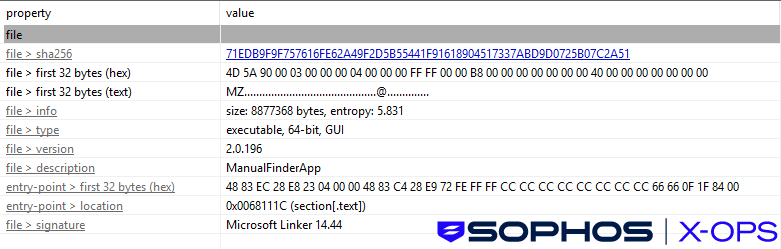
Upon execution, the infostealer harvests browser-stored data, establishes a connection to a command-and-control (C2) server for data exfiltration, and retrieves an additional payload named ManualFinderApp.exe. This file is a trojanized application that functions as an infostealer and a backdoor.
This appears to be a fairly widespread campaign; in its analysis of TamperedChef, TrueSec observed at least five different Google campaign IDs. The duration from the campaign’s onset until the end of the malware’s dormancy period (when the seemingly benign AppSuite PDF Editor switched to active infostealer behavior) was 56 days, closely aligning with the typical 30-60-day cycle of paid advertising campaigns. This suggests that the threat actor likely allowed the ad campaign to run its course, to maximize potential infections, before activating the malicious features.

A five-course attack
1. Initial access: Malvertising and redirects
A user searching for appliance instruction manuals (e.g., for a vacuum cleaner) on Bing was lured via sponsored results to a page on manualslib[.]com, a legitimate library of manuals.
From that page, the user downloaded a PDF file (NEU612C-manual.pdf) to their Downloads folder. This file appeared to be legitimate. The site visit seems to have involved a malvertising URL (ad redirect) originating from Bing search results. The Bing click URL includes tracking and redirect parameters, indicating that the user arrived at the ManualsLib page via a search engine result or ad redirect, as opposed to directly typing the ManualsLib URL into a browser. These long query strings often conceal the final landing page and are typical of malvertising chains or ad-based redirect paths.

Clicking “Download PDF” for file ‘NEU612C-manual.pdf’ initiated redirects through the ad URL (fullpdf[.]com), which could deliver ads or potentially malware. Shortly after, the user was presented with an offer to install a PDF tool, AppSuite PDF, from the domain fullpdf[.]com.
The link was promoted through online ads that appeared on the ManualsLib website, as indicated by tracking codes in the URL.
The link was advertised through online ads on the ManualsLib website, and the malvertising campaign used these ads to promote the potentially malicious AppSuite PDF installer.We have notified ManualsLib of the malicious listing on their site.

2. Execution – installer deployment
From the malicious fullpdf landing page, the user was redirected to one of the domains hosting AppSuite-PDF.msi (e.g., vault.appsuites[.]ai/AppSuite-PDF.msi), where the .msi file was downloaded by the user to the Downloads folder. Upon execution, this installer dropped the file PDFEditorSetup.exe, as well as a malicious JavaScript file (pdfeditor.js) at resources/app/w-electron/bin/release/ and ManualFinderApp.exe in the local/temp directory. The file pdfeditor.js is heavily obfuscated and was flagged by Sophos Next Generation Antivirus (NGAV) as malicious. Researchers at Truesec and G DATA note the obfuscation may be AI-generated, creating unique variants that bypass signature-based detection. The malware includes multiple components for persistence and control, using registry changes, scheduled tasks, and command-line options such as –install, –fullupdate, and –check.
- –install:
Sets up persistence by creating two Windows scheduled tasks (PDFEditorScheduledTask and PDFEditorUScheduledTask) so the malware keeps running after reboot. - –fullupdate:
Activates the main infostealer payload. It identifies security products, kills browsers, and steals credentials, cookies, and history via DPAPI. This command was globally triggered on Aug 21, 2025, after a planned 56-day dormancy. - –check:
Communicates with the C2 server to pull configuration, read browser keys, modify settings, and run commands for data collection and exfiltration.
Sophos has a protection against pdfeditor.js called Mal/Generic-S, and ManualFinderApp.exe, detected as Mal/Isher-Gen, is related to OneStart.ai.

3. Persistence and privilege abuse
The malware establishes autorun entries in the registry (HKCU\SOFTWARE\Microsoft\Windows\CurrentVersion\Run\PDFEditorUpdater) and created scheduled tasks to execute the binary with multiple command-line flags (--install, --fullupdate, --backupupdate, --check, --ping). This is designed to automate reactivation even after system restarts.
4. Payload deployment and credential theft
PDF Editor.exe is installed to %USERPROFILE%\PDF Editor or %LOCALAPPDATA%\Programs\PDF Editor.
Before executing theft operations, it enumerated installed security tools (Bitdefender, CheckPoint, Fortinet, G DATA, Kaspersky, Zillya) via registry queries, likely as an anti-detection measure.
| C:\WINDOWS\system32\cmd.exe /d /s /c "reg query "HKLM\Software\Wow6432Node\Microsoft\Windows\CurrentVersion\Uninstall\{4073CD02-7996-48D7-AFDF-297676C27CA6}" /v "UninstallString"" |
| C:\WINDOWS\system32\cmd.exe /d /s /c "reg query "HKLM\Software\Classes\G DATA ANTIVIRUS"" |
| C:\WINDOWS\system32\cmd.exe /d /s /c "reg query "HKCU\Software\CheckPoint\ZANG"" |
| C:\WINDOWS\system32\cmd.exe /d /s /c "reg query "HKCU\Software\KasperskyLabSetup"" |
| C:\WINDOWS\system32\cmd.exe /d /s /c "reg query "HKLM\Software\Fortinet"" |
| C:\WINDOWS\system32\cmd.exe /d /s /c "reg query "HKLM\Software\Microsoft\Windows\CurrentVersion\Run\Bitdefender" /v "UninstallString"" |
| C:\WINDOWS\system32\cmd.exe /d /s /c "reg query "HKLM\Software\Microsoft\Windows\CurrentVersion\Uninstall\Bitdefender" /v "UninstallString"" |
| C:\WINDOWS\system32\cmd.exe /d /s /c "reg query "HKLM\Software\Microsoft\Windows\CurrentVersion\Uninstall\{96A251BD-7532-4CF9-B87D-158FC685DBC4}" /v "UninstallString"" |
| C:\WINDOWS\system32\cmd.exe /d /s /c "reg query "HKLM\Software\Wow6432Node\Microsoft\Windows\CurrentVersion\Uninstall\REC" /v "UninstallString"" |
| C:\WINDOWS\system32\cmd.exe /d /s /c "reg query "HKLM\Software\Wow6432Node\Microsoft\Windows\CurrentVersion\Uninstall\G DATA ANTIVIRUS" /v "UninstallString"" |
| reg query "HKLM\Software\Wow6432Node\Microsoft\Windows\CurrentVersion\Uninstall\G DATA ANTIVIRUS" /v UninstallString |
| reg query HKLM\Software\Wow6432Node\Microsoft\Windows\CurrentVersion\Uninstall\{4073CD02-7996-48D7-AFDF-297676C27CA6} /v UninstallString |
| reg query "HKLM\Software\Classes\G DATA ANTIVIRUS\\" |
| reg query HKCU\Software\CheckPoint\ZANG\ |
| reg query HKCU\Software\KasperskyLabSetup\ |
| reg query HKLM\Software\Fortinet\ |
| reg query "HKCU\Software\Zillya\Zillya Antivirus\\" |
| reg query HKCU\Software\Microsoft\Windows\CurrentVersion\Run\ |
| reg query HKLM\Software\Microsoft\Windows\CurrentVersion\Run\Bitdefender /v UninstallString |
| reg query HKLM\Software\Microsoft\Windows\CurrentVersion\Uninstall\Bitdefender /v UninstallString |
| reg query HKLM\Software\Microsoft\Windows\CurrentVersion\Uninstall\{96A251BD-7532-4CF9-B87D-158FC685DBC4} /v UninstallString |
| reg query HKLM\Software\Wow6432Node\Microsoft\Windows\CurrentVersion\Uninstall\REC /v UninstallString |
Figure 6: The TamperedChef infostealer attempts to detect installed security agents
PDF Editor.exe also terminated browser processes and utilized the Windows data protection API (DPAPI) to extract stored browser credentials, cookies, and autofill data.
5. Secondary payload and C2
As discussed earlier, the stealer downloaded additional components, including ManualFinderApp.exe. This file is signed by GLINT SOFTWARE SDN. BHD, indicating use of compromised or fraudulent certificates.
As noted by Expel, these certificates have been reported and now revoked (although this won’t disable current installations).
We observed suspicious process behaviour where mshta.exe (a legitimate Windows executable for executing Microsoft HTML Applications) invoked VBScript to execute: C:\Users\<user>\AppData\Local\ManualFinder\ManualFinderApp.exe.
The JavaScript file (C:\Users\[username]\AppData\Local\TEMP\bb1b47cb-962f-fb06-4b84-87ad12b4f37f8de0or.js) reaches out to the C2 domain mka3e8[.]com, then launches the installer file ManualFinder-v2.0.196.msi. This execution originated from a scheduled task with a GUID-like name: sys_component_health_bb1b47cb-962f-fb06-4b84-87ad12b4f37f8de0
This naming convention mimics legitimate Windows maintenance tasks, a common evasion technique.
Dynamic and static analysis confirmed communication with the following URLs:
https[:]//portal[.]manualfinder[.]app/sapi/iidsuccesssrc\main.rs
https[:]//portal[.]manualfinder[.]app/sapi/reg
Code signing abuse
The adversaries distributed variants of AppSuite PDF Editor signed by certificates belonging to multiple entities registered in Malaysia and the US, including:


This indicates the deliberate acquisition or compromise of code-signing certificates to bypass Windows SmartScreen and enhance user trust — a growing trend among financially-motivated threat actors.
According to some reporting, these certificates have now been revoked, but it’s possible that the threat actors may create or acquire further certificates.
MITRE mapping
The following chart maps the observed tactics to the MITRE ATT&CK framework.
| Activity | Attack Tactic | Attack Technique |
|---|---|---|
| Malvertising on search engines (Google/Bing) and malicious lures that redirect users to malicious sites (e.g., fullpdf[.]com, pdftraining[.]com) | Initial Access | T1189 — Drive-by Compromise |
| AppSuite-PDF.msi drops PDFEditorSetup.exe (installer staging) | Persistence | T1105 — Ingress Tool Transfer |
| PDFEditorSetup.exe creates registry and scheduled task entries | Persistence | T1053.005 — Scheduled Task/Job: Scheduled Task |
| PDFEditorSetup.exe installs PDF Editor.exe (final payload) | Execution | T1204.002 — User Execution (installed binary) / T1106 — Native API |
| PDF Editor.exe steals/modifies browser-stored data (credentials, cookies, autofill) | Credential Access | T1555.003 — Credentials from Web Browsers and T1005 — Data from Local System |
| PDF Editor.exe connects to C2 domain(s) (HTTP/S) for exfiltration and remote control | Command and Control / Exfiltration | T1071.001 — Application Layer Protocol: Web Protocols (HTTP/S) and T1041 — Exfiltration Over C2 Channel |
Figure 10: MITRE ATT&CK mapping
Protections
Sophos has multiple protections against this campaign, including but not limited to:
- Mal/Isher-Gen
- JS/Agent-BLMN
- Troj/EvilAI-H
- OneStart.ai (PUA)
Conclusions and recommendations
The threat actors behind the TamperedChef campaign crafted convincing malicious applications, leveraged targeted advertising to achieve large-scale distribution, and secured code-signing certificates. The consequences are severe; users who have installed AppSuite PDF Editor should consider any credentials stored in their browsers to be compromised.
Threat actors are well aware that malvertising can be a fruitful and effective infection vector. It’s very possible that the adversaries behind TamperedChef, and others, will cook from a similar recipe in the future.
Proactive recommended actions
- Avoid installing software from ads:Avoid clicking installation links or pop-ups in online ads — even if they appear to come from familiar or well-known brands. Instead, obtain software only from official vendor sites
- Implement strict application controls: In corporate settings, restrict installations to approved software only where appropriate
- Harden credential management:Disable browser-based password storage where possible and enforce the use of secure, organization-approved password managers; require MFA or passkeys for all accounts to reduce the risk of credential theft and unauthorized access.
- Educate end users on safe software acquisitionConduct awareness training focused on recognizing malvertising, deceptive download pages, and fraudulent installers — reinforcing that software should only be downloaded from official vendor websites or trusted app stores.
Post-incident recommended actions
- Conduct comprehensive endpoint scans using updated threat intelligence to detect known indicators of compromise
- Reimage compromised endpoints and enforce immediate credential resets to eliminate persistence risks
- Verify and enforce Multi-Factor Authentication (MFA) for all impacted users and systems not previously protected
- Strengthen behavioural monitoring and detection capabilities to identify malicious activity and potential follow-on payloads
- Restrict installation of unverified or unauthorized software using application control and publisher validation policies
IOCs relating to this campaign are available on our GitHub repository.